
Frequently Asked Questions (FAQ)
Do you have questions about digital exams?
In our FAQ section, you'll find answers to the most common questions regarding the organization and functionality of digital exams.
If your question is not answered here, please don't hesitate to contact the E-Examination Center.
Contact us
Zentrum für akademische und digitale Kompetenzen
Centre for Academic and Digital Skills
Digitale Lehre
Digital Education
Organization
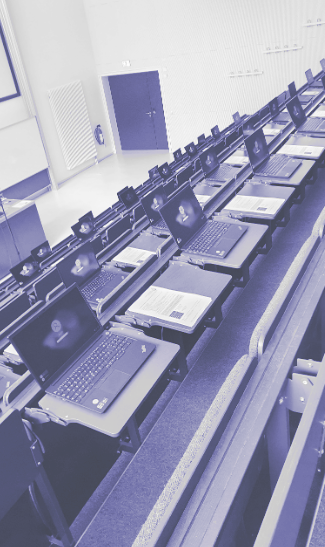
Due to logistical reasons, digital exams can only take place in the following rooms of the university:
- Ernst-Lohmeyer-Platz 6
- Lecture hall 1
- Lecture hall 2
- Lecture hall 3/4
- Ernst-Lohmeyer-Platz 3
- Seminar room 1.12 (PC-Pool)
- Seminar room 2.12 und 2.13
The E-Examination Center is responsible for booking a suitable exam room after your exam has been registered.
For logistical reasons, digital exams are conducted in the following locations:
- Ernst-Lohmeyer-Platz 6
- Lecture hall 1
- Lecture hall 2
- Lecture hall 3/4
- Ernst-Lohmeyer-Platz 3
- Seminar room 1.12 (PC-Pool)
- Seminar room 2.12 und 2.13
Due to the limited number of available laptops and the fixed location of the charging carts, a maximum of 165 students can take part in an E-examination.
However, please note that due to room capacity of Lecture Halls 1 and 2 (Ernst-Lohmeyer-Platz 6), a maximum of 60 students can participate in E-examinations held in these rooms.
The E-Examination Center provides laptops for your exam. These devices are regularly maintained and cleaned.
Neither you nor your students need to bring any personal devices.
There are various options for students entitled to compensation for disadvantages during exams. At Ernst-Lohmeyer-Platz 6, interpreter booths are available for student with extended exam time starting from 18 minutes. These separate booths do not need to be booked - we will take care of the organization.
If needed, headphones can also be provided.
Yes - as long as the lecturer is able to conduct the E-examination independently, a remote examination is possible. In this case, the E-Examination center is responsible for the final technical review of the exam. The lecturer is responsible for supervision, and the participating students use their own devices.
In exceptional cases, alternatives may be possible.
Once your E-examination has been requested via our form, we will process your request and propose an examination date. If you mentioned a preferred date, we will try to accommodate it. After confirmation from our side, you may register your exam with the Central Examination Office (Zentrales Prüfungsamt).
This entire process takes place before the official exam registration period begins, so you should receive our confirmation in time.
E-examinations can be scheduled Monday through Friday between 9:00 AM and 5:00 PM.
The following time periods are available:
- Winter semester 2025/26: February 2 - 20 and March 16 - 27
- Summer semester 2026: July 27 - August 14 and September 14 - 25
- Winter semester 2026/27: February 1 - 19 and March 15 - April 14
E-Examinations outside of these dates may be possible in exceptional cases.
| Registration | Lecturers register their E-examination and any associated repeat exams via the online request form. |
| Confirmation | Lecturers receive a response including device availability, a proposed date, and (preliminary) room confirmation. |
| Course Access | Lecturers are given access to the Moodle exam course to create their digital exam. |
| Sharing of Information | Lecturers inform the E-Examination Center of the final number of students, any accommodations (Nachteilsausgleiche), and optionally how many staff members can assist with setup or dismantling (PC pool excluded). |
| Student Notification | Lecturers inform their students about how to access the exam and the examination process. |
| Finalization | The exam is completed and ready to go. A final technical review is carried out by the E-Examination Center. |
| Exam Day | Setup, administration, and dismantling of the E-examination. Meeting point: 30 minutes before the exam in the examination room (for larger exams with 60+ students: 45 minutes before). |
Technical Setup
You can find a step-by-step guide on how to create an E-examination here.
If you require further assistance or have any additional questions, please don't hesitate to contact the E-Examination Center:
A guide for grading E-examinations - including information on how to offer students a post-exam review - is available here(German only).
If you require further assistance or have any additional questions, please don't hesitate to contact the E-Examination Center:
E-examinations at the University of Greifswald are usually conducted using Moodle Exam - a separate examination platform which is distinct from regular Moodle. This means that courses must be created manually for each exam. Once your exam has been registered, the E-Examination Center will create the corresponding Moodle Exam course for you.
Please note:
Both lecturers and students must log in to Moodle Exam at least once in order to be registered in the system, so they can be successfully added to a course. We recommend communicating this in your course sessions, through the HIS and through the announcements forum in your regular Moodle course.
To log in to Moodle Exam:
1. Visit the Moodle Exam login page.
2. Click on “Shibboleth Login” and enter your university credentials.
E-examination are usually conducted using the Safe Exam Browser (SEB). The SEB creates a secure environment in which both online and offline ressources can be completely blocked or selectively allowed. For example, access to AI tools and LLM can be fully restricted. However, this also affects university services such as OPAC or the AppHub.
While it is technically possible to allow specific exceptions in SEB, we strongly advise against doing so on your own, as functionality during the exam cannot be guaranteed in these cases.
In exceptional cases, we may be able to explore alternative formats. We are currently working on expanding these options and finding a way to safely allow students to use certain websites while SEB is active.
E-Examinations only take place within the intranet of the university. If you are a lecturer wishing to edit or grade an E-Examination from your home office, you will need a VPN.
Distance E-Examinations will also require a VPN for all students.
The University Computer Centre offers instructions on setting up a VPN.
Exam Day
Please allow for an additional 30 minutes each for setup and takedown of the laptops.
If more than 70 students are taking the exam, please plan for 60 minutes each.
The institute offering the exam is responsible for providing qualified supervisors, especially to answer student questions regarding the exam and its topics.
Staff members of the E-Examination Center are present during the exam to offer technical support and to handle the preparation of the examination room.
The lecturers are responsible for organizing and distributing paper sheets for handwritten notes.